Google Ads for Real Estate Agents: A Beginner’s Guide
There's no shortage of ways to market yourself as a real estate agent. Social media, email campaigns, open houses, referrals — the list goes on. But most of those channels ask you to play a long game, building visibility over months before you see any return.
Google Ads works differently. Instead of waiting for clients to find you, it puts you in front of buyers and sellers at the exact moment they're searching.
This guide walks you through how to run a Google Ads campaign from the ground up. Read the step-by-step below.
Table of Contents
How Google Ads Work (The 30-Second Version)
Google Ads runs on an auction system. Every time someone searches on Google, an instant auction takes place behind the scenes— advertisers who bid on that keyword compete for placement, and the winners appear at the top of the results page under a small "Sponsored" label.
Apart from who bids the most, Google also factors in ad quality — how relevant your ad is to the search, and whether the page you're sending people to actually delivers on what the ad promises. A well-targeted ad with a smaller budget can outrank a sloppy one with a bigger spend.
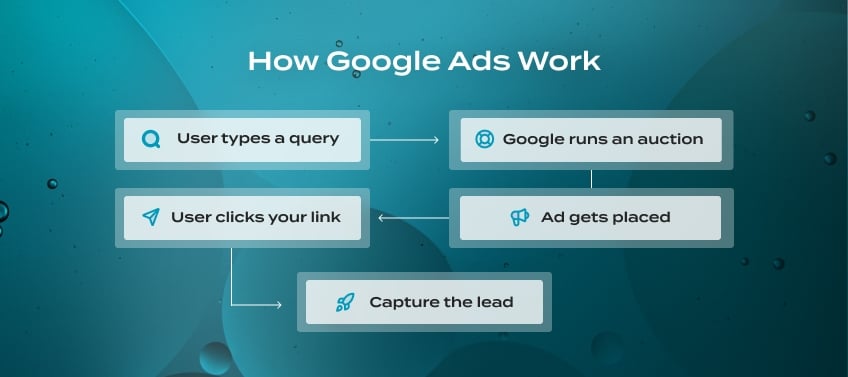
Google Ads pose a specific advantage: they bring you leads that are already actively searching.
Search ads vs. display ads
There are several ad formats available on Google, but two are most relevant for real estate agents.
Search ads are text-based and show up directly in Google search results. Because they're triggered by specific keywords, they reach people who are actively searching — someone typing "homes for sale in Austin" is already in buying mode. That makes Search ads the higher-intent option of the two.
Display ads work differently. Instead of appearing in search results, they show up as visual banners across websites in Google's broader network. They're less about capturing new leads and more about staying visible to people who have already visited your site.
If you're just getting started with Google Ads, Search is the right place to focus. The intent is there, the targeting is precise, and the results are easier to measure.
Do Google Ads Really Work for Real Estate Agents?
Yes, but not for everyone, and not automatically. With Google Ads, you get a stronger prospect than someone passively scrolling on social media and simply getting fed an ad.
That said, Google Ads won't save a weak funnel. If the ad clicks through to a homepage without an obvious next step, that click won’t lead to a conversion. Your budget, then, disappears with little to show for it.
To make your Google Ads strategy work, you’ll need three things in place:
-
A clear niche or geographic focus
-
A dedicated landing page designed to capture leads
-
A realistic timeline for results
Without these, you’re essentially paying for traffic when what you want is to be paying for leads.
What Does It Cost to Run Google Ads as a Real Estate Agent?
On a per-click basis, real estate is actually one of the more affordable industries on Google. WordStream's 2025 Google Ads benchmarks shows that the average cost per click for real estate sits at $2.53, which is well below the all-industry average.
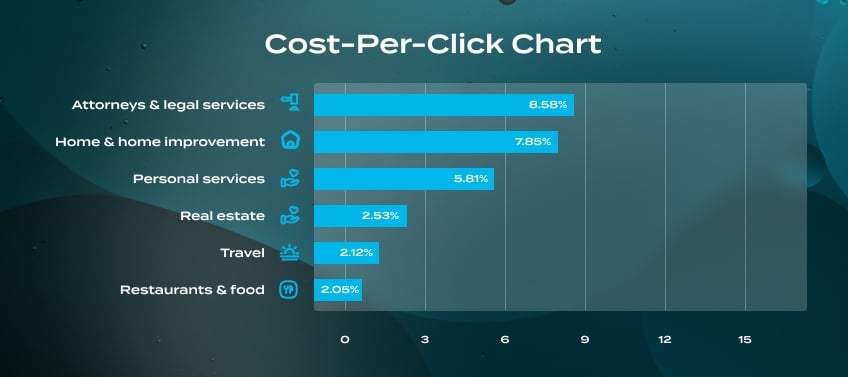
When it comes to Google Ads, real estate’s cost-per-click is among the lowest.
The catch is that real estate clicks are harder to convert than clicks in most other industries. This is because buyers typically take their time, visit multiple websites, and rarely fill out a form on the first visit. So while getting someone to click your ad isn’t expensive, turning that click into an actual lead takes more budget than it would in a higher-urgency industry.
How much, then, should you budget?
Most PPC specialists recommend starting at $1,000 to $1,500 per month. While $500 per month is technically possible, it often isn't enough to generate meaningful lead volume or give Google's algorithm enough data to optimize your campaign. Think of the first 60 to 90 days as a learning period — you're gathering data on which keywords, ads, and landing pages actually convert, not expecting immediate returns.
One more thing worth knowing: Real estate ad costs have been climbing steadily year over year, and that trend isn't reversing. The practical takeaway isn't to avoid Google Ads, though, but to make sure everything connected to your campaign is set up to convert.
A well-targeted ad sending traffic to a purpose-built landing page will outperform a higher-budget campaign pointed at a generic homepage.
Google Ads: A Step-by-step Guide
Step 1: Set Up Your Landing Page
Before you spend a single dollar, you need somewhere worth sending people. Your homepage isn't built to convert ad traffic because it has too many places to go (menu links, about pages, listings, contact forms, etc).
If you already have IDX set up on your site, you're in a great position. A search page where visitors can browse live MLS listings directly on your website is one of the strongest landing pages you can send ad traffic to.
Step 2: Link Google Analytics and Enable Conversion Tracking
If you don't have conversion tracking in place, you won't be able to tell which ads and keywords are actually bringing in leads. Before your campaign goes live:
-
Link Google Analytics to your Google Ads account
-
Set up conversion events for form submissions and phone calls
-
Test that everything is recording correctly before you start spending
Step 3: Choose Your Keywords
-
Go local, not broad.
It's tempting to bid on big terms like "homes for sale" or "real estate agent." The problem is those keywords are dominated by Zillow, Realtor.com, and large brokerages with budgets most individual agents simply can't compete with.Hyper-local, specific keywords are where the real opportunity is. Someone typing "3 bedroom homes for sale in Scottsdale" already knows what they want and where they want it— they're much closer to picking up the phone.
-
Keep buyers and sellers in separate campaigns.
Obviously, buyers and sellers want different things. It’s best to run separate campaigns for each, with ads and landing pages tailored to where each audience is in their journey. -
Block irrelevant searches with negative keywords.
Without them, your ads will show up for searches that have nothing to do with your business — people looking for rentals, real estate school, or job listings. Adding negative keywords early is one of the simplest ways to protect your budget. -
Use Google Keyword Planner to build your list.
It's free, pulls directly from Google's own data, and lets you filter by location. Start with your target area and a few core terms, and let it surface related keywords you might not have thought of on your own. -
Stick to phrase or exact match.
Broad match gives Google too much flexibility and tends to trigger your ads for searches that aren't relevant. Phrase and exact match keep your targeting tight — especially important when you're still figuring out what actually converts in your market.
Step 4: Write Your Ads
Most real estate ad copy leads with the agent's name or brokerage instead of what the searcher actually wants. Someone searching "homes for sale in Denver" doesn't know your name yet. Your ad needs to meet them where they are.
Every strong real estate ad has three things:
-
A local signal. Drop in the city, neighborhood, or zip code. It immediately tells the searcher you're relevant, and that's half the battle.
-
A specific value proposition. What makes working with you different? Response time, neighborhood expertise, a free home valuation, access to listings before they hit the market. Vague phrases like "trusted local expert" don't do much, but specific details do.
-
A clear next step. Make it obvious what you want them to do: e.g., "Search Listings," "Get a Free Home Valuation," "See Homes in Your Price Range."
Step 5: Launch
Once your landing page is ready, tracking is set up, and your keywords and ad copy are in place, it's time to go live.
A few things to set before you hit publish:
-
Geographic targeting. Limit your ads to the specific cities, zip codes, or neighborhoods you actually serve. Casting too wide a net is one of the fastest ways to burn through budget on clicks that will never convert.
-
Ad scheduling. Consider running your ads during hours when you're actually available to respond. A lead who fills out a form at 11pm and doesn't hear back until the next afternoon is much less likely to convert than one you follow up with quickly.
-
Match types. Start with a phrase or exact match rather than a broad match. Broad match gives Google too much flexibility and tends to trigger your ads for searches that aren't relevant to your business.
Then, commit to giving it time. The first 60 to 90 days are a learning period — Google's algorithm needs real data before it can optimize effectively. Resist the urge to make major changes every few days. Set it up thoughtfully, let it run, and evaluate based on trends rather than day-to-day fluctuations.
Step 6: Measure What's Working
Your two best tools here are Google Ads and Google Analytics, linked together so you can see not just who clicked your ad, but what they did after landing on your site.
The numbers worth paying attention to:
-
Click-through rate (CTR) tells you whether your ad copy is connecting. If people are seeing your ad but not clicking, your headline or offer probably isn't hitting the mark.
-
Conversion rate tells you whether your landing page is pulling its weight. Lots of clicks but no leads almost always points back to the page, not the ad.
-
Cost per lead is the number that ties everything together. Divide your total spend by the number of leads generated, and track it by campaign and keyword so you can double down on what's working and cut what isn't.
Make Every Visit Count — No Exceptions
An accessible site means more people can engage with your business.
Frequently Asked Questions
Most PPC specialists recommend starting at $1,000 to $1,500 per month. That gives Google's algorithm enough data to optimize and gives you enough click volume to learn what's working. Plan to treat the first 60 to 90 days as a testing period before drawing any firm conclusions.
You'll likely see clicks and some lead activity within the first few weeks. Consistent, predictable lead flow usually takes 60 to 90 days, which is how long it takes Google to gather enough data to optimize effectively. Agents who pull the plug early are usually just short of the point where things start clicking.
They do different jobs. Google captures people who are already searching. Facebook reaches a more passive audience who may not be thinking about real estate at all. For immediate lead generation, Google tends to win. For building awareness over time, Facebook and Instagram are stronger. When budget allows, both together are the most effective combination.
Yes, and a dedicated landing page, not just a homepage. If you have IDX set up, a property search page where visitors can browse live MLS listings is one of the best places to send ad traffic. It gives people something to engage with, which makes them far more likely to reach out.
Sending traffic to their homepage. When someone clicks an ad promising "Homes for Sale in Austin," they expect to land on a page full of Austin homes. Every dollar you spend on ads is only as good as the page it leads to.
Build a Website That Makes Your Ads Worth Every Dollar
Google Ads can drive traffic, but your website is where leads are won or lost. Agent Image has spent over two decades building real estate websites designed to convert. Whether you're just getting started or ready to level up what you already have, we'd love to help.
Book a free consultation today and let's talk about what your website could look like.